GoHighLevel (GHL) CRM: Complete Beginner-to-Advanced Guide
GoHighLevel (GHL), commonly called HighLevel,
is an all-in-one CRM, marketing, sales, automation, communication, website,
funnel, appointment, reputation management, and business growth platform.
For a beginner, GHL can initially look complicated because it contains many
different features. The easiest way to understand it is to think of GHL as
a system that manages the complete customer journey:
Visitor → Lead → Contact → Qualified Lead → Opportunity → Appointment
→ Proposal → Customer → Review → Repeat Business
This guide explains the major concepts of GHL CRM from the basics to advanced
automation in simple language.
1. What Is GoHighLevel?
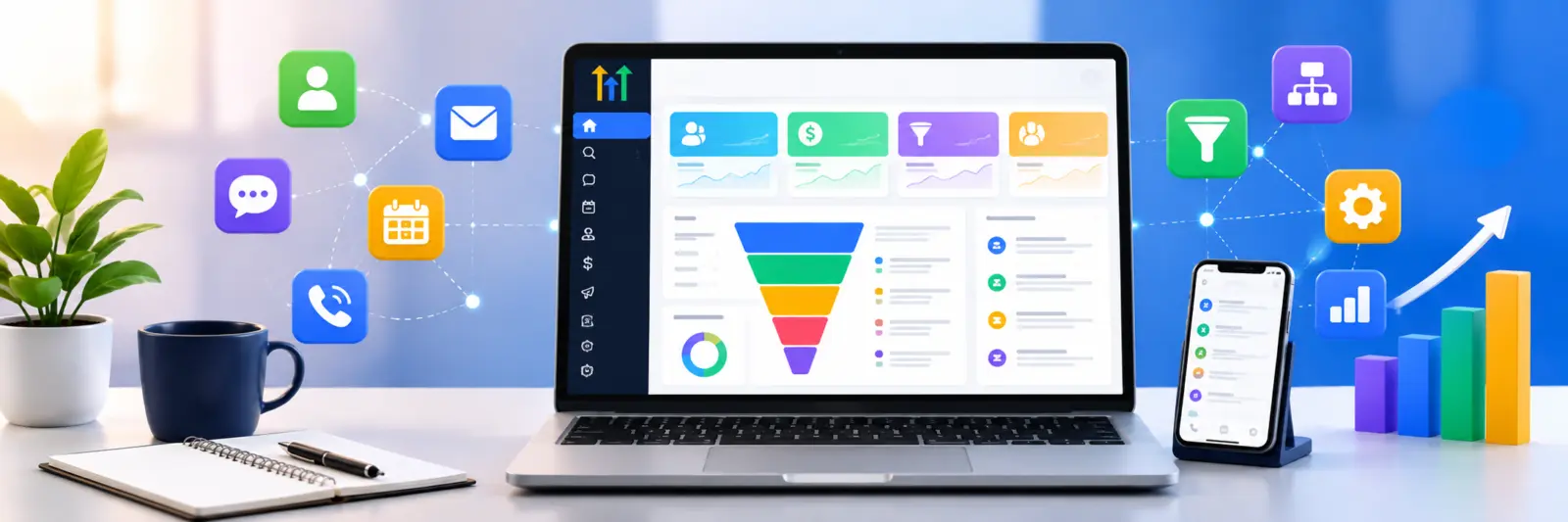
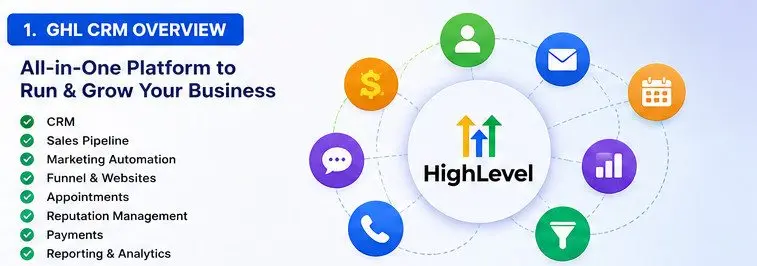
GoHighLevel is a cloud-based business platform designed to help businesses
capture leads, organize customer information, communicate with prospects,
manage sales opportunities, automate follow-ups, schedule appointments,
build websites and funnels, collect payments, request reviews, and measure
marketing and sales performance.
What Problems Does GHL Solve?
A business may traditionally use many separate tools:
- One CRM for contacts
- Another application for email marketing
- Another system for SMS
- Another appointment booking tool
- Another website builder
- Another funnel builder
- Another review management platform
- Another sales pipeline system
- Spreadsheets for lead tracking
- Manual reminders for follow-ups
GHL attempts to bring many of these functions into one ecosystem.
The Basic GHL Concept
Imagine that someone visits your website and asks for a quotation.
GHL can capture that person, store their information, create a sales
opportunity, notify your sales team, send an immediate response, schedule
a meeting, follow up automatically, and track whether the deal was won or lost.
2. What Does CRM Mean?
CRM means Customer Relationship Management.
A CRM is a system that stores and manages information about your prospects
and customers and helps your business manage its relationship with them.
Example of CRM Information
- Customer name
- Email address
- Phone number
- Company
- Website
- Lead source
- Customer requirements
- Salesperson
- Opportunity value
- Communication history
- Appointments
- Tasks
- Notes
- Sales stage
- Purchase history
Why Is CRM Important?
Without a CRM, customer information can become scattered across email,
spreadsheets, messaging applications, phone records, and personal notes.
A CRM gives the business a central location where the customer journey
can be tracked.
3. The Most Important GHL Concepts
Before learning advanced features, understand these fundamental concepts.
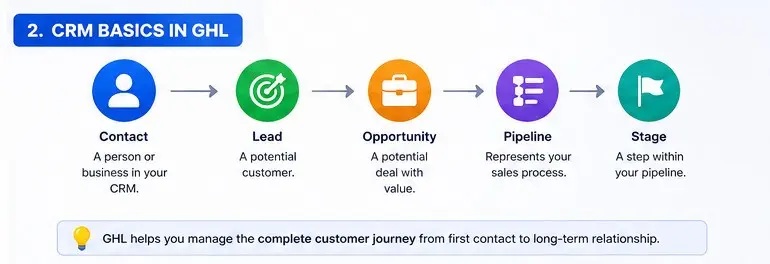
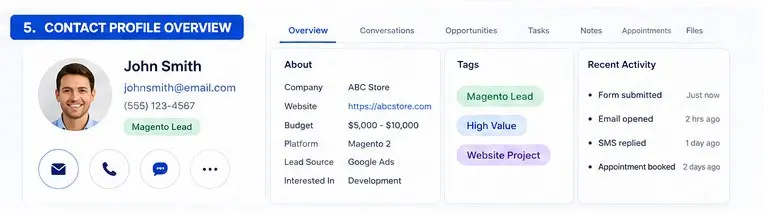
Contact
A contact is a person stored inside the CRM.
Example
John Smith submits a quotation form. GHL stores John as a contact.
Lead
A lead is a person or business that may become a customer.
Opportunity
An opportunity represents a potential business deal.
Example
John wants a Magento development project worth $5,000.
That potential deal can be represented as an opportunity.
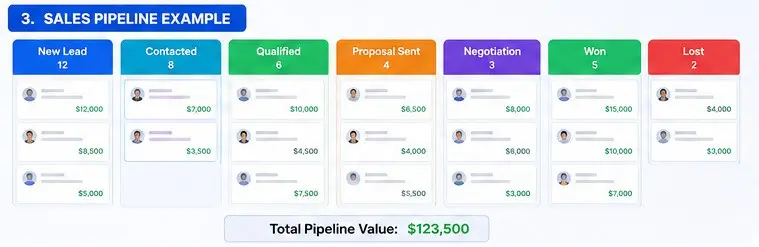
Pipeline
A pipeline represents the sales process through which an
opportunity moves.
Example
New Lead → Contacted → Qualified → Meeting → Proposal → Negotiation → Won
Stage
A stage represents a particular point in a pipeline.
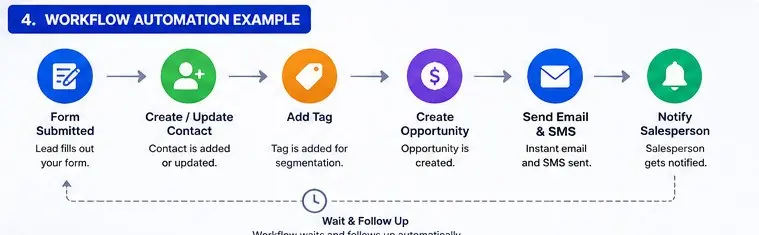
Workflow
A workflow is an automated sequence of actions.
Example
Form submitted → Create contact → Add tag → Send email → Notify salesperson
→ Create opportunity → Wait → Follow up.
4. The Complete Customer Journey in GHL
One of the best ways to understand GHL is to understand the complete
customer lifecycle.
Typical Customer Journey
- Visitor discovers the business
- Visitor visits website or landing page
- Visitor submits a form
- GHL creates or updates the contact
- Lead source is recorded
- Tags and custom fields are updated
- An opportunity may be created
- Opportunity enters a pipeline
- Salesperson is assigned
- Customer receives an automated response
- Salesperson follows up
- Customer books an appointment
- Proposal is sent
- Opportunity moves through sales stages
- Deal becomes won or lost
- Customer is onboarded
- Review request is sent
- Customer may receive future marketing
5. GHL Dashboard
The GHL interface can change over time, but the platform generally contains
areas for managing CRM, conversations, opportunities, calendars, websites,
funnels, forms, automation, marketing, reputation, payments, reporting,
and account settings.
Major Areas You Should Learn
- Contacts
- Conversations
- Opportunities
- Calendars
- Automation / Workflows
- Forms
- Surveys
- Funnels
- Websites
- Marketing
- Reputation
- Payments
- Reporting
- Settings
6. Contacts in GHL
Contacts are one of the most important parts of the CRM.
Every customer interaction should ideally connect to the correct contact.
Information a Contact Can Contain
- First name
- Last name
- Phone
- Address
- Company
- Website
- Tags
- Custom fields
- Notes
- Tasks
- Appointments
- Conversations
- Opportunities
Why Contact Management Matters
If a customer contacts your company multiple times, you want the CRM to
recognize the same person rather than creating disconnected customer records.
7. Contact Fields
Contact fields store information about a contact.
Standard Fields
- Name
- Phone
- Address
- Company
Custom Fields
Custom fields allow you to store information specific to your business.
Example for a Software Development Company
- Ecommerce Platform
- Magento Version
- OpenCart Version
- Website URL
- Monthly Budget
- Project Type
- Required Features
- Expected Launch Date
8. Tags in GHL
Tags are labels that help categorize contacts.
Examples of Tags
- Magento Lead
- OpenCart Lead
- SEO Lead
- Existing Customer
- VIP Customer
- Google Lead
- Facebook Lead
- Hot Lead
- Newsletter
Tags and Automation
Tags can be used to start or control automation.
For example:
When the Magento Lead tag is added, start the Magento follow-up workflow.
9. Tags vs Custom Fields
| Feature | Tag | Custom Field |
|---|---|---|
| Purpose | Categorization | Store specific information |
| Example | Magento Lead | Magento Version: 2.4.7 |
| Multiple values | Yes | Depends on field type |
| Automation | Very useful | Very useful |
10. Leads
A lead is a potential customer who has shown some level of interest in
your product or service.
Common Lead Sources
- Google Search
- Google Ads
- Website
- Landing page
- Email campaign
- Referral
- Phone call
- Cold outreach
11. Lead Source Tracking
Lead source tracking tells you where your leads originate.
Why Lead Source Is Important
Suppose you receive 200 leads from Facebook and 50 leads from Google.
It may appear that Facebook is performing better.
But suppose Facebook generates only 5 customers while Google generates
15 customers.
The number of leads alone does not tell you which channel is better.
You need to measure the complete conversion process.
12. Opportunities
An opportunity represents a potential revenue-generating deal.
Example
Opportunity: Magento Development Project
Value: $5,000
Contact: John Smith
Stage: Proposal Sent
13. Sales Pipelines
A pipeline visually represents your sales process.
Example Pipeline
- New Lead
- Contacted
- Qualified
- Meeting Scheduled
- Proposal Sent
- Negotiation
- Payment Pending
- Won
- Lost
Why Pipelines Matter
A salesperson can immediately see which deals are new, which require
follow-up, which have proposals, and which have been won or lost.
14. Pipeline Stages
Each stage should represent a meaningful milestone in your sales process.
Bad Pipeline Design
Lead 1 → Lead 2 → Lead 3 → Follow-up 1 → Follow-up 2
Better Pipeline Design
New Inquiry → Qualified → Meeting → Proposal → Negotiation → Won
15. Sales Pipeline Example for an Ecommerce Development Company
- New Inquiry
- Lead Contacted
- Requirements Received
- Qualified
- Technical Discussion
- Quotation Sent
- Follow-up
- Negotiation
- Payment Pending
- Won
16. Conversations
Conversations provide a central location for managing communication
with leads and customers across supported communication channels.
Communication Can Include
- SMS
- Phone communication
- Other connected messaging channels
The exact available channels depend on your account, integrations,
configuration, and current GHL functionality.
17. Why Conversation History Is Important
Imagine a customer has already discussed a project with one salesperson.
Another salesperson later takes over the account.
The new salesperson can review the CRM history instead of asking the
customer to repeat everything.
Example
Customer wants Magento 2 migration, has a budget of $5,000, and already
received a quotation.
That information should be available to the team through the CRM history.
18. Tasks
Tasks are activities that a team member needs to perform.
Examples
- Call customer
- Send quotation
- Follow up with lead
- Check requirements
- Schedule meeting
- Contact customer after proposal
19. Notes
Notes are internal information added to a contact or sales record.
Example
Customer currently uses OpenCart 3 and wants migration to OpenCart 4.
Customer has approximately 15,000 products.
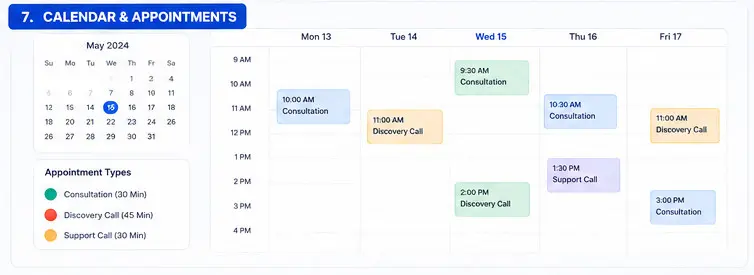
20. Calendars
GHL can be used for appointment scheduling.
Typical Appointment Process
- Customer opens booking page
- Customer selects date
- Customer selects available time
- Customer provides information
- Appointment is created
- Confirmation is sent
- Reminder is sent
- Meeting occurs
21. Appointment Reminders
Appointment reminders can reduce missed meetings.
Example Automation
Appointment booked → Confirmation → 24-hour reminder → 1-hour reminder
22. Forms
Forms collect information from visitors and prospects.
Example Quote Form
- Name
- Phone
- Company
- Website
- Platform
- Project requirement
- Budget
- Message
23. What Happens After a Form Submission?
A form submission can become the starting point of an automation process.
Form submitted → Contact created → Tags added → Opportunity created
→ Salesperson notified → Email sent → Follow-up begins
24. Surveys
Surveys are useful for collecting more detailed information.
Example Project Discovery Survey
- What platform are you currently using?
- What is your website URL?
- What problems are you experiencing?
- What features do you require?
- What is your approximate budget?
- When do you want the project completed?
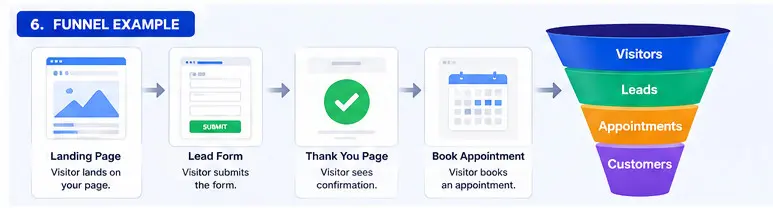
25. Funnels
A funnel is a sequence of pages designed to guide visitors toward a
specific conversion action.
Simple Funnel
Advertisement → Landing Page → Form → Thank You Page → Appointment
Why Funnels Are Useful
A traditional website provides many navigation choices. A funnel focuses
the visitor on a particular objective.
26. Website vs Funnel
Website
A website normally provides broad information and navigation.
Home → About → Services → Products → Blog → Contact
Funnel
A funnel normally focuses on a particular conversion.
Landing Page → Form → Appointment → Sale
27. Landing Pages
A landing page is designed around a specific marketing objective.
Typical Landing Page Elements
- Headline
- Subheadline
- Benefits
- Features
- Social proof
- Testimonials
- Case studies
- Call-to-action
- Lead form
- Appointment booking
28. Workflows
Workflows are one of the most powerful concepts in GHL.
A workflow allows the system to automatically perform tasks when
specific events happen.
The Basic Workflow Formula
Trigger → Condition → Action → Wait → Condition → Action
29. Workflow Triggers
A trigger is the event that starts a workflow.
Common Trigger Examples
- Form submitted
- Contact created
- Tag added
- Appointment booked
- Appointment status changed
- Opportunity created
- Opportunity stage changed
- Customer response
- Date/time condition
- Other supported CRM or marketing events
30. Workflow Actions
Actions are the things GHL does after the workflow is triggered.
Common Actions
- Send email
- Send SMS
- Add tag
- Remove tag
- Create opportunity
- Update opportunity
- Assign user
- Create task
- Wait
- Use conditions
- Update contact information
- Move opportunity
- Send internal notification
31. If/Else Conditions
Conditions make workflows intelligent instead of simply linear.
Example
If budget is greater than $5,000, send the lead to a high-value sales process.
Otherwise, use the standard process.
Budget > $5,000 → High-Value Workflow
Budget ≤ $5,000 → Standard Workflow
32. Wait Actions
A workflow can wait before performing another action.
Example
- Send email
- Wait one day
- Send SMS
- Wait two days
- Send another email
33. Complete Lead Follow-Up Workflow
Imagine someone submits a Magento development form.
Workflow
- Form submitted
- Create or update contact
- Add Magento Lead tag
- Create opportunity
- Assign salesperson
- Send confirmation email
- Send SMS
- Notify salesperson
- Wait one day
- Check whether customer replied
- If replied, stop automated follow-up
- If no reply, send follow-up
34. Lead Nurturing
Many leads do not purchase immediately.
Lead nurturing keeps your business connected with prospects until they
become ready to buy.
Example Nurturing Sequence
- Day 0: Welcome email
- Day 2: Helpful article
- Day 5: Case study
- Day 10: Service benefits
- Day 15: Consultation invitation
- Day 30: Follow-up
35. Email Marketing
GHL can be used to send marketing and transactional-style communications,
depending on your configuration and integrations.
Common Email Uses
- Welcome emails
- Lead nurturing
- Newsletters
- Product promotions
- Appointment confirmations
- Follow-ups
- Customer onboarding
36. SMS Marketing
SMS can be useful for short and time-sensitive communication.
Examples
- Appointment reminders
- Lead follow-ups
- Confirmation messages
- Short notifications
Always configure SMS marketing according to applicable consent,
privacy, and messaging laws.
37. Email vs SMS
Email Is Better For
- Detailed information
- Proposals
- Documents
- Newsletters
- Long-form content
SMS Is Better For
- Quick reminders
- Appointment confirmations
- Short follow-ups
- Time-sensitive communication
38. Lead Scoring
Lead scoring assigns numerical values to leads based on characteristics
or actions.
Example Scoring Model
- Email opened: +2
- Email clicked: +5
- Pricing page viewed: +10
- Consultation booked: +20
- Quote requested: +30
A lead with a high score may deserve faster sales attention.
39. Hot, Warm and Cold Leads
Cold Lead
Low engagement or low buying intent.
Warm Lead
Has demonstrated some interest.
Hot Lead
Demonstrates strong buying intent.
Example
Reading a blog article may indicate low intent.
Requesting a quotation generally indicates much stronger intent.
40. Lead Assignment
Leads can be assigned to members of the sales team according to your
business rules and configuration.
Example Sales Team
- Rahul
- Amit
- John
You can design an assignment process so that incoming leads are distributed
among the appropriate team members.
41. Internal Notifications
Internal notifications alert your team when something important happens.
Example
New lead received → Check lead value → If high-value → Notify sales manager.
42. Speed-to-Lead
Speed-to-lead refers to how quickly your business responds after receiving
a new lead.
Automation can immediately acknowledge the inquiry while simultaneously
notifying the salesperson.
Example
Lead submitted → Instant email → SMS → Sales notification → Call task.
43. Reputation Management
GHL also provides reputation-management functionality that can help
businesses request and manage customer reviews.
Example Review Workflow
Deal won → Service completed → Wait → Send review request.
44. Review Automation
Review requests can be incorporated into customer lifecycle automation.
Example
- Opportunity becomes Won
- Customer receives service
- Workflow waits for the appropriate period
- Review request is sent
- Customer submits review
45. Payments
GHL also provides payment-related capabilities and integrations.
Depending on your account, country, and payment configuration, these
capabilities can support products, services, invoices, payment links,
and recurring payment scenarios.
46. Products and Services
Businesses can structure their products or services so they can be
incorporated into sales and payment processes where supported.
Example
- Magento Development — $2,000
- OpenCart Development — $1,500
- SEO Package — $500/month
- Maintenance — $100/month
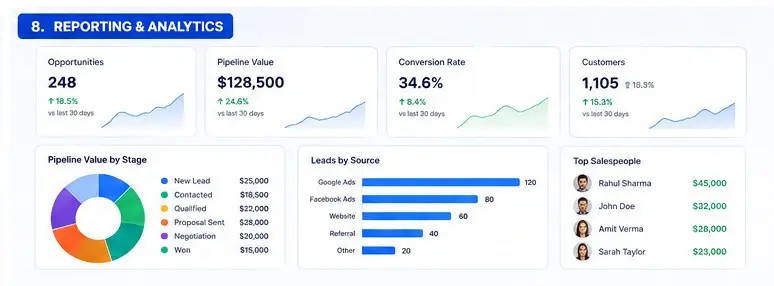
47. Reporting and Analytics
A CRM should not only store information. It should help management
understand business performance.
Important Metrics
- Total leads
- Qualified leads
- Appointments
- Proposals
- Won opportunities
- Lost opportunities
- Pipeline value
- Won revenue
- Lead conversion rate
- Lead source performance
- Salesperson performance
48. Pipeline Value
Suppose you have the following opportunities:
- Deal A — $10,000
- Deal B — $20,000
- Deal C — $30,000
- Deal D — $40,000
The total potential pipeline value is $100,000.
However, pipeline value is not the same as actual revenue because some
opportunities will not close.
49. Conversion Rate
Conversion rate measures how many leads progress to a desired outcome.
Example
100 leads produce 10 customers.
Lead-to-customer conversion rate = 10%.
If the same 100 leads produce 15 customers, conversion rises to
15%.
50. Agency Accounts
One of GHL’s important concepts for agencies is the ability to manage
multiple client environments.
Basic Structure
Agency → Client A → Client B → Client C
Each client environment can have its own CRM data, workflows, pipelines,
calendars, websites, funnels, and other configured resources.
51. Agency vs Sub-Account
Agency Account
The agency-level environment used to manage the overall account and
client environments.
Sub-Account
An individual business or client environment.
Example
A marketing agency could have:
- Dental Clinic
- Real Estate Company
- Law Firm
- eCommerce Company
52. Users and Permissions
Different team members should receive appropriate permissions.
Example Roles
- Administrator
- Salesperson
- Marketing Manager
- Support Agent
- Account Manager
Exact permissions should be configured according to the responsibilities
of each user.
53. CRM Data Segmentation
Segmentation means dividing contacts into meaningful groups.
Possible Segments
- New leads
- Existing customers
- High-value prospects
- Magento customers
- OpenCart customers
- Inactive customers
- Customers from Google
- Customers from Facebook
54. Personalization
CRM data can be used to personalize customer communication.
Generic
Hello Customer,
Personalized
Hello John,
Personalization should be useful and relevant rather than excessive.
55. Complete Example for a Magento Development Business
Step 1: Visitor
A visitor searches Google for Magento development.
Step 2: Landing Page
The visitor lands on a Magento development page.
Step 3: Form
The visitor submits a quotation form.
Step 4: Contact
GHL creates or updates the contact.
Step 5: Tag
The contact receives the Magento Lead tag.
Step 6: Opportunity
A Magento Development opportunity is created.
Step 7: Assignment
The appropriate salesperson receives the lead.
Step 8: Automation
Confirmation email and SMS are sent.
Step 9: Appointment
The customer books a consultation.
Step 10: Sales
The salesperson discusses requirements and sends a quotation.
Step 11: Won
The customer accepts the quotation.
Step 12: Customer
The customer enters the delivery/onboarding process.
Step 13: Review
After successful delivery, a review request can be sent.
56. GHL Marketing Funnel Example
A complete marketing funnel could look like:
Advertisement → Landing Page → Lead Form → CRM → Automation →
Appointment → Sales Call → Proposal → Payment → Customer
57. GHL Sales Funnel vs Sales Pipeline
Marketing Funnel
Focuses on moving a visitor toward a conversion.
Visitor → Lead → Appointment → Customer
Sales Pipeline
Focuses on the progress of an opportunity through the sales process.
New Lead → Qualified → Proposal → Negotiation → Won
These concepts work together but represent different parts of the customer
journey.
58. Workflow Architecture
Good workflow design is extremely important.
Simple Workflow
Form submitted → Send email.
Intermediate Workflow
Form submitted → Create opportunity → Assign salesperson → Send email →
Wait → Send SMS.
Advanced Workflow
Form submitted → Identify service → Identify budget → Assign salesperson →
Create opportunity → Send personalized communication → Wait → Check response
→ Branch based on response → Notify sales manager when necessary.
59. Automation Logic
The best way to understand GHL automation is:
WHEN → IF → THEN → WAIT → CHECK → THEN
Example
WHEN: Customer submits form.
IF: Budget is greater than $5,000.
THEN: Assign senior salesperson.
WAIT: One day.
CHECK: Did customer respond?
YES: Stop automated follow-up.
NO: Send another follow-up.
60. Customer Onboarding
GHL can also be used to automate parts of the customer onboarding process.
Example
Deal Won → Welcome email → Create onboarding task → Send questionnaire →
Schedule kickoff meeting → Notify account manager.
61. Customer Retention
CRM should not stop working after the customer makes a purchase.
After the sale, you can continue managing:
- Customer communication
- Follow-ups
- Reviews
- Renewals
- Upsells
- Cross-sells
- Future campaigns
62. Upselling and Cross-Selling
Upselling
Selling a higher-value version of something the customer already wants.
Cross-Selling
Selling a related product or service.
Example
A customer purchases Magento development.
Possible cross-sell:
- SEO
- Maintenance
- Security audit
- Performance optimization
- Custom extension development
63. GHL Reporting Mindset
Do not measure only the number of leads.
Measure the complete funnel:
- Visitors
- Leads
- Qualified leads
- Appointments
- Show-ups
- Proposals
- Won deals
- Revenue
- Customer lifetime value
64. Important CRM Metrics
Lead Volume
Number of leads generated.
Lead Conversion Rate
Percentage of leads becoming customers.
Appointment Rate
Percentage of leads booking appointments.
Show Rate
Percentage of booked appointments that actually occur.
Close Rate
Percentage of opportunities that become won deals.
Average Deal Value
Average revenue generated per closed deal.
65. Common Beginner Mistakes in GHL
Mistake 1: Creating Too Many Workflows
Build workflows around real business processes rather than creating
unnecessary automation for every small activity.
Mistake 2: Creating Too Many Tags
Use a consistent naming and segmentation strategy.
Mistake 3: Not Tracking Lead Sources
If you don’t know where customers came from, marketing decisions become
difficult.
Mistake 4: Poor Pipeline Design
Pipeline stages should represent actual sales milestones.
Mistake 5: Not Testing Automation
Always test workflows using test contacts before activating important
customer-facing automation.
Mistake 6: Sending Too Many Messages
Automation should improve communication, not annoy customers.
66. How to Build a GHL CRM From Scratch
Step 1: Understand the Business
Identify products, services, customers, sales process, marketing channels,
team members, and customer journey.
Step 2: Define Lead Sources
Decide how you will track Google, Facebook, website, referral, LinkedIn,
advertising, and other sources.
Step 3: Design Contact Fields
Create only the fields your business actually needs.
Step 4: Design Tags
Create a logical tagging system.
Step 5: Design Pipeline
Define the actual sales stages.
Step 6: Create Forms
Build lead-capture forms for your website and campaigns.
Step 7: Connect Forms to CRM
Make sure submissions correctly create or update contacts.
Step 8: Create Basic Workflows
Start with lead confirmation, notifications, opportunity creation,
and follow-up.
Step 9: Configure Calendars
Create appropriate appointment types and availability.
Step 10: Create Nurturing
Build longer-term follow-up for leads that do not immediately purchase.
Step 11: Configure Reporting
Track lead sources, opportunities, conversion rates, revenue, and sales
performance.
Step 12: Test Everything
Test forms, workflows, emails, SMS, appointment booking, opportunity
movement, notifications, and reporting.
67. Complete GHL Architecture
The following model is useful for understanding the complete system:
Traffic → Website/Funnel → Form → Contact → Segmentation →
Opportunity → Pipeline → Salesperson → Appointment → Proposal →
Negotiation → Won → Payment → Customer → Onboarding → Service →
Review → Retention → Upsell
68. How Everything Connects Together
Website
Brings visitors into the business.
Funnel
Focuses visitors on a specific conversion.
Form
Collects visitor information.
Contact
Stores the person in the CRM.
Tag
Categorizes the contact.
Opportunity
Represents potential revenue.
Pipeline
Tracks the sales process.
Calendar
Manages appointments.
Workflow
Automates repetitive actions.
Conversation
Stores and manages communication.
Reporting
Measures performance.
69. Beginner GHL Learning Roadmap
Level 1: CRM Basics
- Contact
- Lead
- Opportunity
- Pipeline
- Stage
- Tag
- Custom field
- Task
- Note
Level 2: Communication
- Conversations
- SMS
- Calls
- Templates
Level 3: Sales
- Opportunities
- Pipelines
- Deal values
- Sales stages
- Lead assignment
- Follow-up
Level 4: Scheduling
- Calendars
- Availability
- Appointments
- Reminders
- Rescheduling
Level 5: Automation
- Triggers
- Actions
- Wait steps
- If/Else
- Conditions
- Workflow branching
Level 6: Marketing
- Forms
- Surveys
- Funnels
- Landing pages
- Email marketing
- SMS marketing
- Lead nurturing
Level 7: Advanced CRM
- Lead scoring
- Segmentation
- Advanced workflows
- Sales automation
- Customer onboarding
- Review automation
- Retention
- Upselling
Level 8: Agency
- Agency account
- Sub-accounts
- Users
- Permissions
- Client onboarding
- Snapshots
- SaaS-related features
- White-label concepts
70. GHL Vocabulary Cheat Sheet
| Term | Simple Meaning |
|---|---|
| Contact | A person stored in the CRM |
| Lead | A potential customer |
| Opportunity | A potential sales deal |
| Pipeline | The sales process |
| Stage | A step within the pipeline |
| Tag | A category or label |
| Custom Field | Business-specific customer information |
| Workflow | Automated process |
| Trigger | Event that starts automation |
| Action | Something automation performs |
| Condition | Rule used to control automation |
| Form | Collects visitor information |
| Funnel | Conversion-focused page sequence |
| Calendar | Appointment scheduling |
| Conversation | Customer communication history |
| Task | Action assigned to a team member |
| Note | Internal information |
| Lead Source | Where a lead originated |
| Opportunity Value | Potential revenue from a deal |
| Sub-Account | Individual client/business environment |
| Agency | Top-level environment managing client accounts |
71. The Five Questions That Explain Most of GHL
Question 1: Who Is the Person?
Contact.
Question 2: What Might They Buy?
Opportunity.
Question 3: Where Are They in the Sales Process?
Pipeline and Stage.
Question 4: Where Did They Come From?
Lead Source.
Question 5: What Should Happen Automatically?
Workflow.
72. The Complete GHL Mental Model
If you remember only one concept from this entire guide, remember this:
GHL is not just a contact database. It is a system for managing and
automating the customer journey.
A visitor becomes a lead. The lead becomes a contact. The contact can become
an opportunity. The opportunity moves through a pipeline. Automation follows
up with the prospect. The prospect books an appointment. Sales closes the
deal. The customer is onboarded. The business requests a review and continues
the relationship.
The Complete Picture
Traffic → Website → Funnel → Form → Contact → Tagging → Qualification →
Opportunity → Pipeline → Appointment → Communication → Proposal →
Negotiation → Won → Payment → Customer → Onboarding → Review →
Retention → Upsell → Repeat Business
73. What You Should Learn Next
Once you understand the concepts above, the next step should not be simply
reading more theory. The best way to become proficient in GHL is to build
a complete working CRM.
Recommended Practical Project
Build a fictional Magento Development Agency CRM.
Build These Components
- Create contacts
- Create Magento-related custom fields
- Create lead-source fields
- Create tags
- Create a sales pipeline
- Create a Magento quotation form
- Create a lead-capture funnel
- Create an appointment calendar
- Create a new-lead workflow
- Create a lead-nurturing workflow
- Create appointment reminders
- Create proposal follow-up automation
- Create won-deal automation
- Create customer onboarding automation
- Create review-request automation
- Create reporting dashboards
Once you can build this complete system yourself, you will have moved
beyond simply understanding GHL terminology and will start understanding
how GHL can be designed as a real business CRM and automation platform.
Recent Articles