

Introduction to Zoho CRM Modules
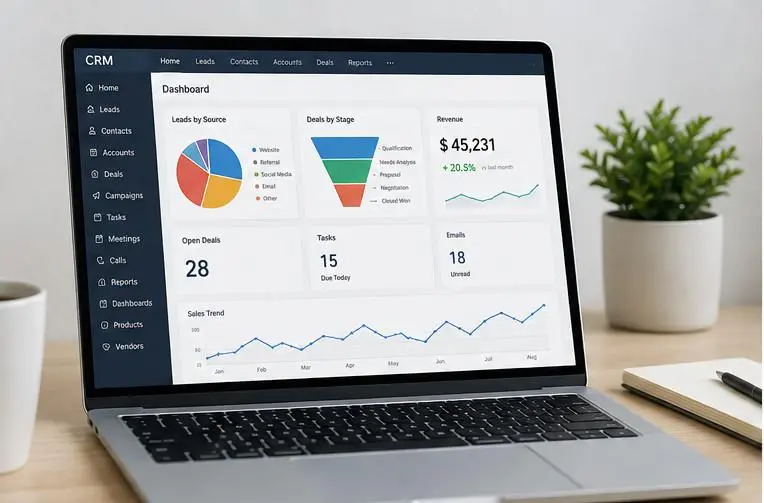
A CRM is more useful when business data is organized in a way that reflects how an organization actually works. Instead of keeping customers, sales opportunities, activities, and business records in one place, Zoho CRM modules categorize information into logical groups.
Modules in Zoho CRM are organized repositories of business data of a particular type. For example, Leads can contain potential customers, Contacts can contain people your business communicates with, Accounts can represent companies, and Deals can represent sales opportunities. Zoho CRM also allows businesses to create custom modules when their data does not fit easily into the predefined structure.
This makes understanding standard and custom modules in Zoho CRM important when setting up or optimizing a CRM.
Standard modules offer the basic framework for common sales, marketing, customer service, and inventory processes. Custom modules allow businesses to build on that foundation and create a CRM structure around industry-specific processes.
What Are Modules in Zoho CRM?
Modules are sections of Zoho CRM used to store, organize, and manage different types of records.
Think of a module as a dedicated database table designed around a particular business entity or process.
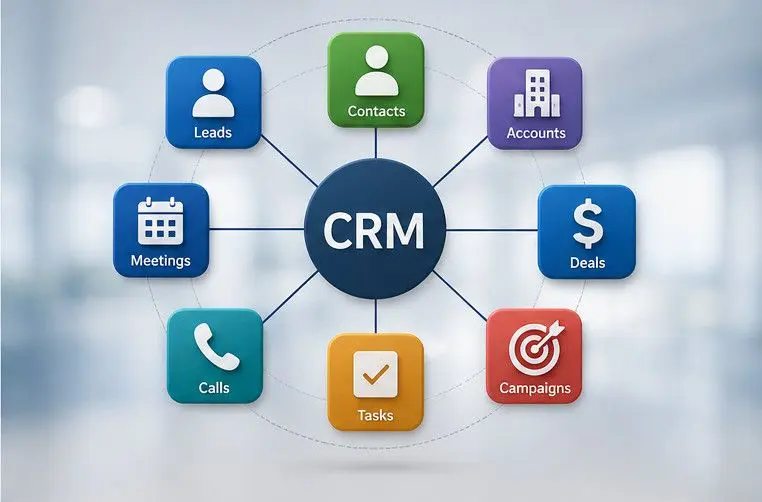
Examples of Zoho CRM Modules
- Leads – Potential customers
- Contacts – Individual people
- Accounts – Companies or organizations
- Deals – Sales opportunities
- Products – Products or services offered
- Campaigns – Marketing campaigns
- Tasks – Activities that need to be completed
- Vendors – Suppliers and business partners
Each module contains records, and each record contains fields that store specific information.
Example of Contact Fields
- First Name
- Last Name
- Phone
- Job Title
- Account
- Lead Source
This structured approach makes it easier to search, update, automate, report on, and analyze business information.
Why Are Zoho CRM Modules Important?
A well-designed module structure can help businesses:
- Keep customer and operational data organized
- Reduce dependence on spreadsheets
- Standardize data collection
- Build automated workflows
- Create meaningful reports and dashboards
- Connect related business records
- Improve sales and customer management
- Give employees faster access to relevant information
In short, modules form the foundation of the CRM’s data structure.
What Are Standard Modules in Zoho CRM?
Standard modules are predefined modules provided by Zoho CRM for commonly used business processes.
They are designed to support common sales, marketing, customer, and inventory management functions. Zoho provides standard modules with predefined fields and layouts, while allowing businesses to customize many aspects of them.
Common Zoho CRM Standard Modules
Some common standard modules include Leads, Contacts, Accounts, Deals, Campaigns, Products, Vendors, Tasks, Calls, Meetings, Quotes, Invoices, Sales Orders, and Purchase Orders.
1. Leads
The Leads module stores information about people or organizations that may become customers.
Common Lead Sources
- Website forms
- Social media
- Online advertising
- Events
- Phone calls
- Email campaigns
- Referrals
For example, if someone submits a “Request a Demo” form on a company’s website, their information can be added to the Leads module.
The sales team can then qualify the lead and determine whether it should move further into the sales process.
2. Contacts
The Contacts module stores information about individual people your business communicates with.
Examples of Contacts
- Customers
- Decision-makers
- Purchasing managers
- Business owners
- Existing client representatives
Contacts can be associated with Accounts and Deals, allowing sales teams to understand the relationship between people, organizations, and opportunities.
3. Accounts
The Accounts module generally represents companies or organizations that your business deals with.
Example Accounts
- ABC Technologies
- Global Manufacturing Ltd.
- XYZ Retail Group
An Account can have multiple Contacts and Deals associated with it. This provides sales teams with a broader view of their relationship with an organization.
4. Deals
The Deals module is used to manage sales opportunities.
Deal Information
- Opportunity name
- Deal value
- Sales stage
- Closing date
- Account
- Contact
- Deal owner
- Probability
Example Deal
Deal: CRM Implementation – ABC Technologies
Value: $25,000
Stage: Proposal Sent
Expected Closing: September 2026
This allows sales managers to monitor the pipeline and forecast potential revenue.
5. Activities, Tasks, Calls, and Meetings
CRM management is not only about storing customer information. Salespeople also need to manage activities.
Zoho CRM provides functionality for activities such as:
- Tasks
- Calls
- Meetings
For example, a salesperson can create a task to follow up with a customer after a product demonstration.
This helps teams maintain consistent follow-ups and prevents important activities from being forgotten.
6. Products
The Products module can be used to manage the products or services a business sells.
Product Information
- Product name
- Product code
- Price
- Product category
- Description
- Vendor
- Stock-related information where applicable
For example, an IT company could use Products to manage software packages, implementation services, support plans, and consulting services.
7. Campaigns
The Campaigns module helps businesses manage marketing campaigns.
Campaign Examples
- Email campaigns
- Advertising campaigns
- Events
- Webinars
- Trade shows
- Promotional campaigns
Marketing teams can use campaign data alongside lead and contact information to better understand marketing performance.
8. Vendors
The Vendors module is useful for businesses that work with suppliers or third-party vendors.
Vendor Information
- Raw material suppliers
- Logistics providers
- Equipment vendors
- Service providers
This helps businesses keep vendor-related information organized within the CRM ecosystem.
What Are Custom Modules in Zoho CRM?
Custom modules in Zoho CRM are user-created modules designed to manage information that does not fit naturally into the standard modules.
While standard modules cover common CRM processes, every business has unique data requirements.
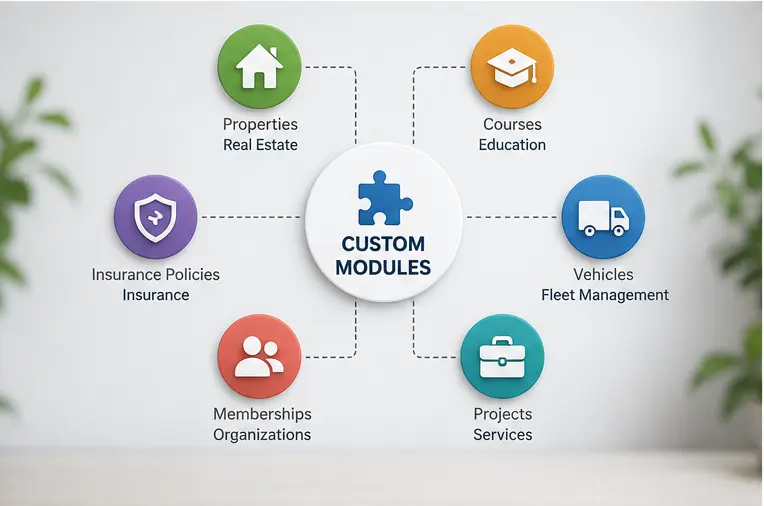
Examples of Custom Modules
- Real estate – Properties
- Education – Students and Courses
- Insurance – Insurance Policies
- Membership organizations – Memberships
These entities do not necessarily fit neatly into Leads, Contacts, Accounts, or Deals. This is where Zoho CRM custom modules become useful.
Zoho allows businesses to create custom modules using its module customization tools without requiring traditional programming for basic module creation. Custom modules can also contain fields, permissions, workflows, relationships, reports, and other CRM capabilities.
Why Do Businesses Need Custom Modules?
Businesses often have processes that are too specific to represent effectively with standard modules.
Example: Real Estate Business
A real estate company might use:
- Leads – Potential buyers
- Contacts – Buyers and sellers
- Accounts – Corporate customers
- Deals – Property transactions
- Properties – Individual properties
Trying to store property information inside Contacts or Deals could result in confusing and poorly structured data.
A dedicated Properties custom module creates a much cleaner data model.
Standard Modules vs. Custom Modules in Zoho CRM
The biggest difference between standard and custom modules is their purpose.
FlexibilityDesigned around common CRM requirementsDesigned around specific business requirementsRelationshipsCan connect with other CRM modulesCan connect with standard and other custom modulesAutomationSupports CRM automationCan be used with workflows and automationReportingStandard CRM reportingCustom reports can be created around custom dataBest ForCommon sales and customer processesIndustry-specific or unique processes
| Feature | Standard Modules | Custom Modules |
|---|---|---|
| Purpose | Manage common CRM processes | Manage business-specific information |
| Availability | Predefined by Zoho CRM | Created by the organization |
| Initial Structure | Predefined fields and layouts | Structure designed by the business |
| Customization | Can be customized | Highly configurable |
| Use Cases | Leads, Contacts, Accounts, Deals, Products, etc. | |
| Properties, Students, Policies, Vehicles, Projects, etc. | ||
An important point is that choosing a custom module does not mean standard modules become unnecessary. In many cases, the best CRM architecture combines both.
Practical Examples of Custom Modules in Zoho CRM
Custom modules become easier to understand when we look at practical business examples.
1. Projects Module
A software development company could create a Projects custom module.
Project Information
- Project name
- Client
- Project manager
- Start date
- End date
- Project status
- Budget
- Project type
- Delivery stage
The Projects module could then be connected to Accounts, Contacts, Deals, and Tasks.
2. Properties Module
A real estate company could create a Properties module.
Property Information
- Property name
- Property type
- Location
- Price
- Size
- Number of bedrooms
- Availability
- Property owner
- Listing status
Properties could be connected to Leads, Contacts, and Deals. This gives agents a structured way to manage inventory and customer interest.
3. Service Contracts Module
A company providing maintenance or managed services could create a Service Contracts module.
Contract Information
- Contract number
- Customer
- Start date
- Expiration date
- Service type
- Contract value
- Renewal status
- Assigned account manager
Automation could remind employees when contracts are approaching expiration.
4. Courses and Students Modules
An educational institution may need more than Leads and Contacts.
It could create custom modules such as:
- Students
- Courses
- Enrollments
- Instructors
For example, a Student can be connected to multiple Courses, while each Course can have multiple Students.
5. Insurance Policies Module
An insurance agency could create a Policies custom module.
Policy Information
- Policy number
- Policyholder
- Policy type
- Premium
- Start date
- Expiry date
- Coverage amount
- Renewal status
- Assigned agent
The policy could be connected to the appropriate Contact or Account.
6. Vehicles Module
An automotive company, fleet operator, or vehicle rental business could create a Vehicles module.
Vehicle Information
- Vehicle registration number
- Vehicle model
- Manufacturer
- Purchase date
- Service date
- Customer
- Vehicle status
- Insurance expiry
This gives employees a centralized location for vehicle-related information.
7. Suppliers Module
Although Zoho CRM already provides a Vendors module, some businesses may need a specialized Suppliers structure with additional information.
Supplier Information
- Supplier category
- Manufacturing capability
- Certifications
- Contract status
- Delivery performance
- Quality rating
Whether a custom module is necessary depends on how different the requirement is from the standard Vendors module.
8. Memberships Module
Gyms, clubs, associations, and membership organizations can create a Memberships custom module.
Membership Information
- Membership ID
- Member
- Membership type
- Start date
- Expiry date
- Payment status
- Renewal status
- Assigned representative
Automations can then trigger reminders before memberships expire.
When Should a Business Use Custom Modules?
Not every business needs a large number of custom modules.
Before creating one, ask whether the information can be managed effectively using an existing standard module and its customizable fields.
A custom module is generally appropriate when the business has a distinct entity or process that deserves its own records, relationships, permissions, workflows, and reporting.
Use a Custom Module When:
1. The Data Represents a Distinct Business Entity
If the information represents something fundamentally different from a Lead, Contact, Account, Deal, Product, or another existing module, a custom module may be appropriate.
- Real estate: Property
- Education: Course
- Insurance: Policy
- Fleet management: Vehicle
2. You Need Multiple Records of the Same Entity
Suppose one customer owns several properties. Putting all property information into a single Contact record would make the data difficult to manage.
A Properties module allows each property to have its own record.
3. The Process Requires Its Own Workflow
If a business entity has its own lifecycle, a custom module can provide a clearer structure.
Example: Service Contract Lifecycle
Draft → Active → Renewal Due → Renewed → Expired
This is different from a typical sales Deal lifecycle.
4. You Need Specialized Reporting
If management needs reports specifically around a business entity, creating a dedicated module can make reporting easier.
- Contracts expiring this month
- Properties available by city
- Students enrolled in each course
- Policies due for renewal
- Vehicles due for servicing
5. Spreadsheets Are Becoming Difficult to Manage
A common warning sign is when employees maintain important operational information in multiple spreadsheets.
For example:
- CRM: Customer information
- Excel: Service contracts
- Excel: Renewal dates
- Excel: Account managers
- Excel: Service status
A custom module can bring that information into the CRM and connect it with customer records.
Benefits of Custom Modules in Zoho CRM
Creating custom modules strategically can improve both CRM usability and business process management.
1. Better Data Organization
Custom modules provide dedicated locations for business-specific information.
Instead of forcing unrelated information into standard modules, teams can create a logical structure.
2. Industry-Specific CRM Management
Different industries operate differently.
A healthcare organization, real estate company, educational institution, and insurance agency have very different data models.
Custom modules allow Zoho CRM to reflect those differences.
3. Improved Workflows
Custom modules can be incorporated into CRM workflows and automation.
For example, a contract approaching its expiration date could trigger an internal reminder or follow-up process.
4. Greater Flexibility
Businesses can create fields and layouts based on their operational requirements.
This means the CRM does not have to follow a one-size-fits-all structure.
5. Better Reporting
A dedicated module can make it easier to create reports around specific business processes.
Instead of extracting information from multiple spreadsheets, managers can analyze data directly within the CRM.
6. Reduced Dependency on Spreadsheets
When operational information lives outside the CRM, teams may have to manually update multiple systems.
Moving appropriate information into custom modules can reduce duplicate data entry and improve visibility.
7. Improved Business Process Management
Custom modules can become part of a broader CRM workflow.
Example:
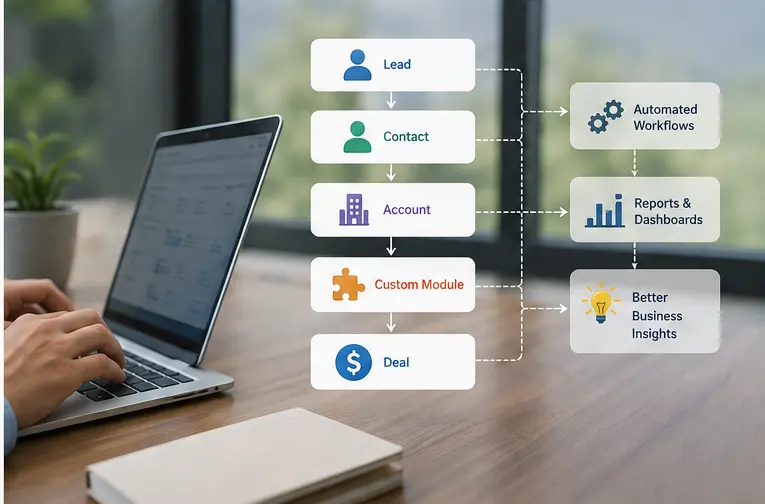
Customer → Service Contract → Renewal Reminder → Follow-Up Task → Renewal Deal
This creates a connected process instead of isolated data.
How Standard and Custom Modules Work Together
One of the biggest advantages of Zoho CRM customization is that custom modules do not have to operate independently.
They can be connected with standard modules and other custom modules using relationships.
Example CRM Structures
Real Estate: Lead → Contact → Property → Deal
Software Company: Account → Project → Tasks
Insurance Company: Contact → Policy → Renewal Opportunity
These relationships create a more complete view of the customer and business process.
Example: Real Estate CRM
Imagine a real estate company using Zoho CRM.
Possible CRM Structure
Leads
Potential Buyers
↓
Contacts
Qualified Buyers
↓
Properties
Available Properties
↓
Deals
Property Transactions
A buyer could be connected to several properties, and a selected property could eventually be connected to a Deal.
This creates a structured data model that reflects how the business actually operates.
How to Decide Between a Standard and Custom Module
Before creating a custom module, use a simple decision process.
Step 1: Identify the Information
What type of data are you trying to manage?
- Customer
- Company
- Sales opportunity
- Product
- Project
- Property
- Contract
- Membership
Step 2: Check Existing Standard Modules
Ask whether an existing Zoho CRM module already represents the information.
If the answer is yes, start with the standard module.
Step 3: Customize the Standard Module First
Zoho CRM standard modules can be customized with additional fields, sections, permissions, and other configuration options.
For example, if you simply need five additional fields for a Contact, creating a new custom module probably is not necessary.
Step 4: Identify Whether the Entity Has Its Own Lifecycle
If the information has its own records, relationships, workflow, and reporting requirements, consider creating a custom module.
Step 5: Design the Relationships
Determine how the new module should connect to:
- Leads
- Contacts
- Accounts
- Deals
- Products
- Tasks
- Other custom modules
This step is important because the module structure affects automation, reporting, and user experience.
Best Practices for Using Zoho CRM Custom Modules
Creating a custom module is relatively straightforward, but designing the right CRM structure requires careful planning.
Keep Modules Purpose-Specific
Do not create a custom module simply because a standard module contains too many fields.
Create one when you are managing a genuinely distinct business entity or process.
Avoid Duplicate Data
Before creating a module, determine whether the same information already exists somewhere else in the CRM.
Duplicate structures can create confusion and reporting problems.
Plan Relationships Before Building
Think about how records will connect.
For example:
Account → Projects → Tasks
is more useful than creating Projects without connecting them to customer information.
Define Required Fields
Determine which information users must enter when creating a record.
Example: Property Required Fields
- Property name
- Location
- Property type
- Price
- Availability
Plan Automation
Ask:
- What should happen when a record is created?
- What should happen when its status changes?
- Who needs to be notified?
- Which tasks should be created automatically?
- Are reminders required?
Design Reports in Advance
Think about what management needs to measure before finalizing the module.
Example Reports
- Number of active contracts
- Revenue by project
- Properties by location
- Membership renewals
- Policies expiring soon
This helps ensure the module captures the right data from the beginning.
Common Mistakes to Avoid
Creating Too Many Custom Modules
More modules do not necessarily mean a better CRM.
An overly complex CRM can make navigation, training, reporting, and maintenance more difficult.
Using Custom Modules for Simple Fields
If you only need additional information about a Contact, Account, or Deal, adding custom fields may be better than creating an entirely new module.
Ignoring Data Relationships
A custom module becomes significantly more useful when it is properly connected to relevant CRM records.
Replicating Existing Modules
Do not create a custom module that duplicates the purpose of an existing standard module without a clear business reason.
Designing Without User Input
CRM administrators should work with sales, marketing, customer service, and operations teams to understand how the data is actually used.
A technically correct module can still fail if it does not match employees’ daily workflows.
Frequently Asked Questions About Zoho CRM Modules
What are standard modules in Zoho CRM?
Standard modules are predefined CRM modules designed for common business processes. Examples include Leads, Contacts, Accounts, Deals, Campaigns, Products, Vendors, Tasks, Calls, and Meetings.
What are custom modules in Zoho CRM?
Custom modules are user-created modules designed to manage business-specific information that does not fit appropriately into existing standard modules.
Examples include Properties, Projects, Policies, Students, Courses, Vehicles, and Memberships.
Can standard modules be customized in Zoho CRM?
Yes. Standard modules can be customized in many ways, including adding fields, changing layouts, configuring permissions, and adjusting other module settings.
Can custom modules connect with standard modules?
Yes. Custom modules can be linked with standard modules and other custom modules to create relationships between business records.
Should every business create custom modules?
No. Businesses should create custom modules only when standard modules and their available customization options cannot adequately represent a distinct business entity or process.
Can custom modules be used for automation?
Yes. Zoho CRM supports workflow rules and other automation capabilities for custom modules, depending on the feature and CRM edition.
Are custom modules available in every Zoho CRM edition?
Availability and limits depend on the Zoho CRM edition. Zoho’s current specifications list custom-module limits for Standard, Professional, Enterprise, and Ultimate editions, while the Free edition does not include custom modules.
Conclusion
Understanding the difference between standard and custom modules in Zoho CRM is essential for building an organized and scalable CRM.
Common business processes such as lead management, contact management, account management, sales opportunities, marketing campaigns, products, and activities are based on standard modules.
When a business needs to deal with information that is unique to its industry or operating model, it can add custom modules to that foundation. Examples include Properties for real estate companies, Projects for service businesses, Policies for insurance agencies, Courses for educational institutions, and Memberships for clubs.
The key is not to create custom modules just for the sake of custom modules. First, look at the standard modules and customize them as needed. Create a custom module when the business has a unique entity or process that requires its own data structure.
When done correctly, standard and custom modules complement each other to build a connected CRM environment with better data organization, automation, reporting, and business visibility.
Zoho CRM customization investment and the right module architecture can make the difference between a CRM that simply stores data and one that supports business processes and growth.
Recent Articles