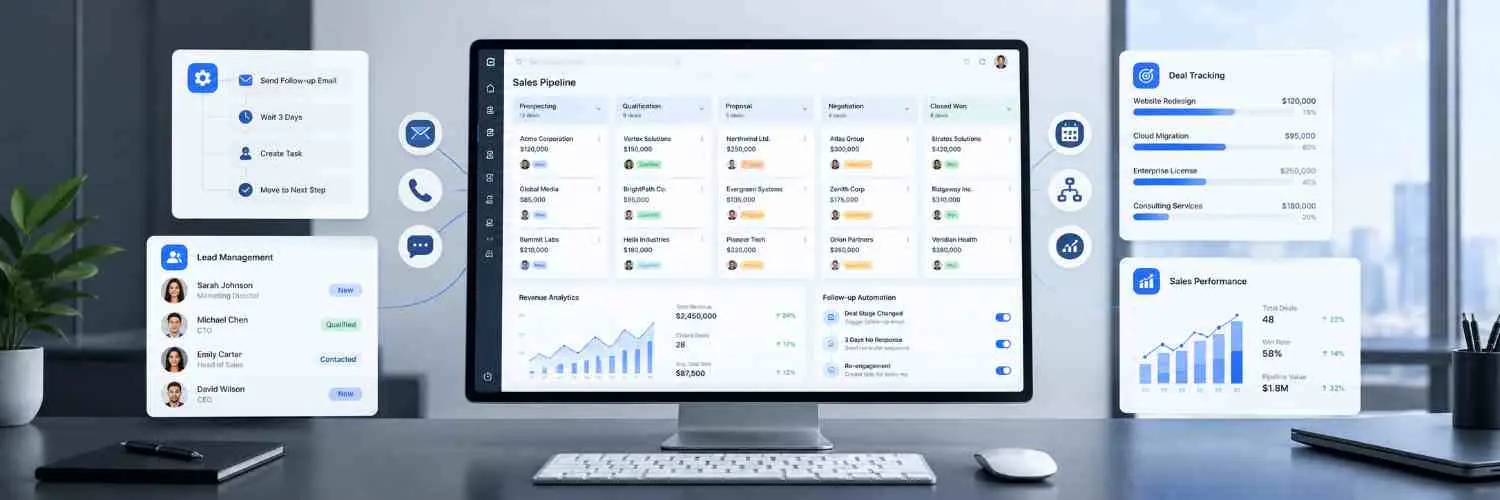
It also helps businesses establish clear responsibilities for every opportunity. Sales representatives know which leads they need to contact, while managers can monitor pipeline movement and identify areas that require improvement.
Why Businesses Need a Visual Sales Pipeline
Without a proper CRM system, sales management often depends on individual employees remembering what needs to be done. This creates unnecessary delays, inconsistent communication, and missed business opportunities.
Common Sales Management Challenges
- Leads are not followed up on time.
- Sales managers cannot easily identify pending opportunities.
- Different team members maintain separate customer records.
- Important WhatsApp conversations get lost.
- Sales representatives spend too much time updating spreadsheets.
- Managers cannot accurately understand the sales pipeline value.
- Incoming enquiries are not distributed equally among team members.
- Businesses struggle to identify why potential customers are not converting.
A visual sales pipeline solves these problems by providing a clear overview of every opportunity.
With LeadScaler Pro, your team can see what is happening, identify what needs attention, and take the next action without unnecessary delays.
Complete LeadScaler Pro Feature Suite for Better Sales Management
LeadScaler Pro combines essential sales management features in one centralized workspace. From capturing new enquiries to tracking successful conversions, every stage of the sales process becomes easier to manage.
1. Visual Drag-and-Drop Sales Pipelines
Every sales team follows a different process. A real estate company may manage property enquiries, while a marketing agency may track client consultations, proposals, and project agreements.
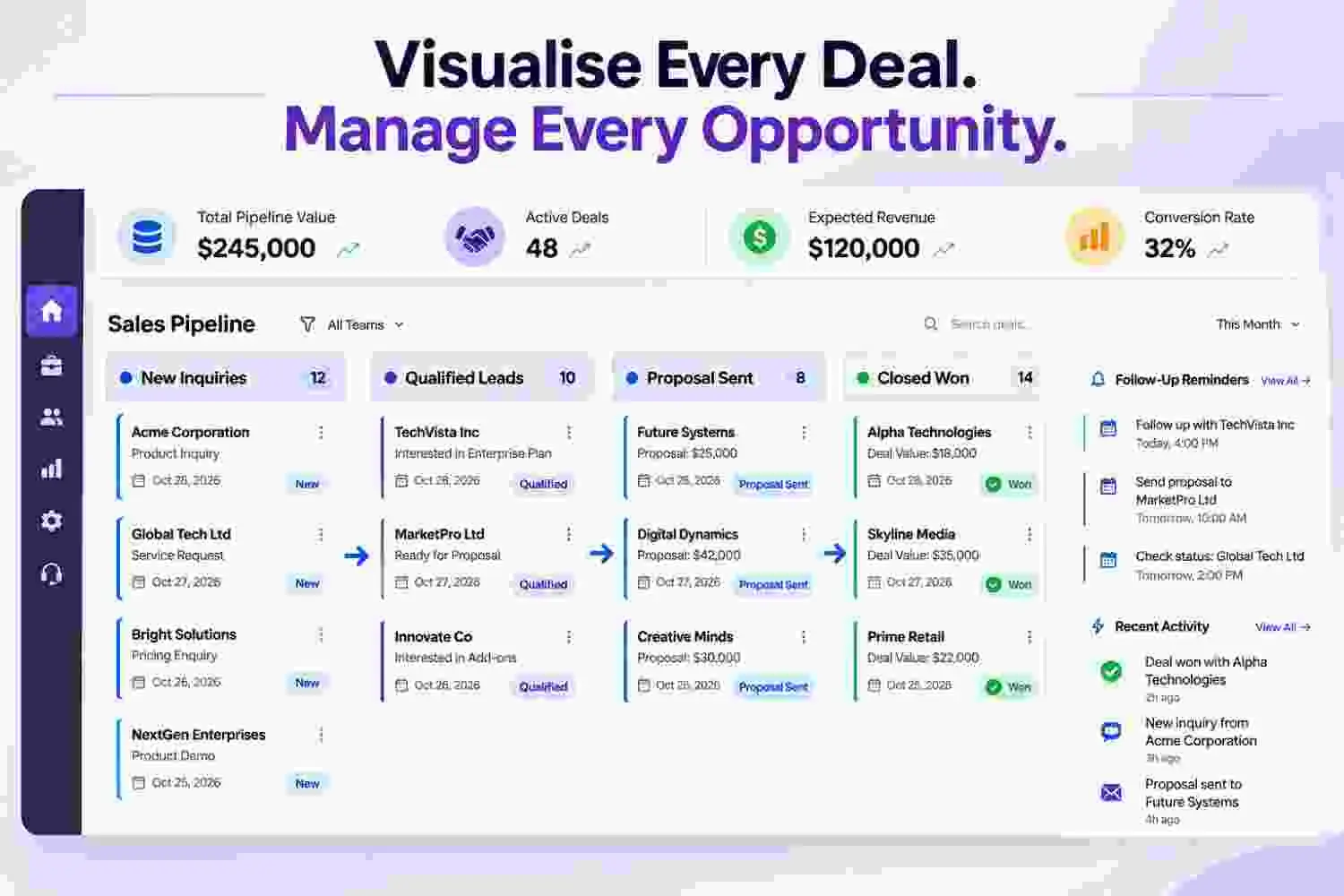
LeadScaler Pro allows businesses to create customized sales pipelines that match their actual sales processes. You can move opportunities between stages using a simple drag-and-drop interface.
Each deal remains visible within its respective stage, helping sales representatives understand their current workload and managers monitor the overall sales position.
Key Features
- Create custom sales stages according to your business requirements.
- Define win probabilities for different pipeline stages.
- Configure mandatory fields when moving deals forward.
- Maintain multiple pipelines for different products, services, or revenue streams.
- Track deal values and progress from a centralized dashboard.
- Organize opportunities according to their current sales status.
How Does It Help Your Business?
Your team gets a clear understanding of every opportunity. Managers can quickly identify which deals require attention and which opportunities are closer to conversion.
Multiple pipelines also make it easier to manage different sales processes independently. For example, you can maintain separate pipelines for inbound enquiries, enterprise sales, renewals, and partner deals.
Example: Managing a Sales Pipeline
Suppose your business receives 50 enquiries in a month. Instead of maintaining a separate spreadsheet, your sales team can organize all 50 opportunities in a visual pipeline.
New enquiries can be moved to qualified leads, followed by scheduled demonstrations, proposals, and final conversions. Managers can review the pipeline at any time and understand the progress of every opportunity.
Organize your sales process with greater clarity using LeadScaler Pro.
2. Automated Deal Rotting Alerts
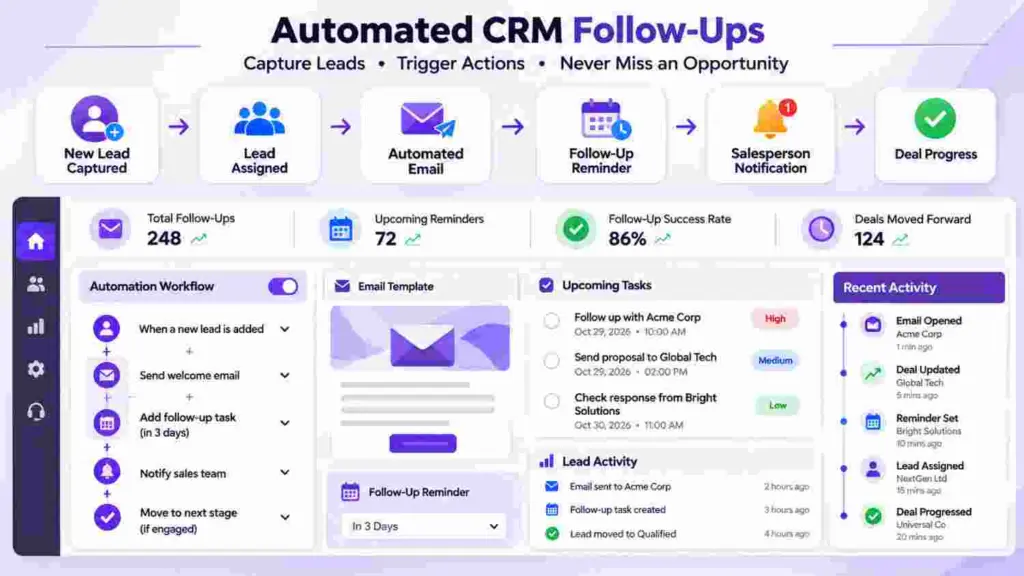
One of the biggest reasons businesses lose sales is delayed follow-up. A prospect may request a quotation today, but if nobody contacts them again, they may choose another service provider.
As sales teams handle multiple opportunities simultaneously, remembering every pending follow-up becomes difficult. Some deals may remain untouched for several days, even when the prospect is genuinely interested.
LeadScaler Pro helps prevent this situation through automated deal inactivity alerts.
The system can identify deals that have remained untouched for a configured period, such as 48 hours, and automatically alert the responsible sales representative.
Key Features
- Configure inactivity thresholds for different pipeline stages.
- Automatically identify deals without recent activity.
- Create follow-up tasks for stalled opportunities.
- Notify the assigned deal owner about inactive deals.
- Help sales managers identify opportunities that need immediate attention.
- Reduce the chances of important leads being forgotten.
How Does It Help Your Business?
Automated deal alerts improve follow-up accountability. Instead of manually checking every opportunity, sales representatives can receive reminders when a deal requires attention.
Managers can also identify representatives who have several inactive opportunities and take the necessary action to improve follow-up performance.
Example: Preventing Missed Opportunities
Imagine a customer requests a quotation for your services. Your representative sends the proposal but becomes busy with other enquiries and forgets to follow up.
With deal inactivity alerts, LeadScaler Pro can identify the untouched opportunity after the configured period and create a follow-up task for the assigned representative.
This helps your business maintain communication with potential customers and reduces revenue leakage caused by missed follow-ups.
Do not let promising opportunities go cold. Keep every important deal moving forward.
3. Unified Customer Timeline
Customer conversations often happen across multiple communication channels. A prospect may initially contact your business through WhatsApp, receive a follow-up email, attend a phone call, and later request a quotation.
When this information is scattered across different platforms, understanding the complete customer journey becomes difficult. Sales representatives may need to search through old messages or ask colleagues for previous conversation details.
LeadScaler Pro brings important customer interactions together in one centralized timeline, helping your team maintain better visibility into customer communication.
Key Features
- Two-way WhatsApp conversation history.
- Email communication history.
- Phone call and appointment records.
- Internal notes and team collaboration.
- @mentions for involving relevant team members.
- File attachments, quotations, and contract links.
- Chronological customer interaction records.
How Does It Help Your Business?
Your sales representatives can understand previous interactions before contacting a customer again. They can review important discussions, check customer requirements, and continue conversations with better context.
It also improves collaboration between departments. When another team member takes responsibility for an opportunity, they can refer to the available customer interaction history instead of starting from the beginning.
Example: A Connected Customer Experience
Consider a prospect who contacts your company through WhatsApp and later requests additional information through email.
Your sales representative can review the available communication history and understand what has already been discussed. The team can also add internal notes about customer requirements, pricing discussions, and the next follow-up action.
This creates a more organized customer experience and reduces unnecessary communication gaps.
Keep your customer conversations connected and your team informed.
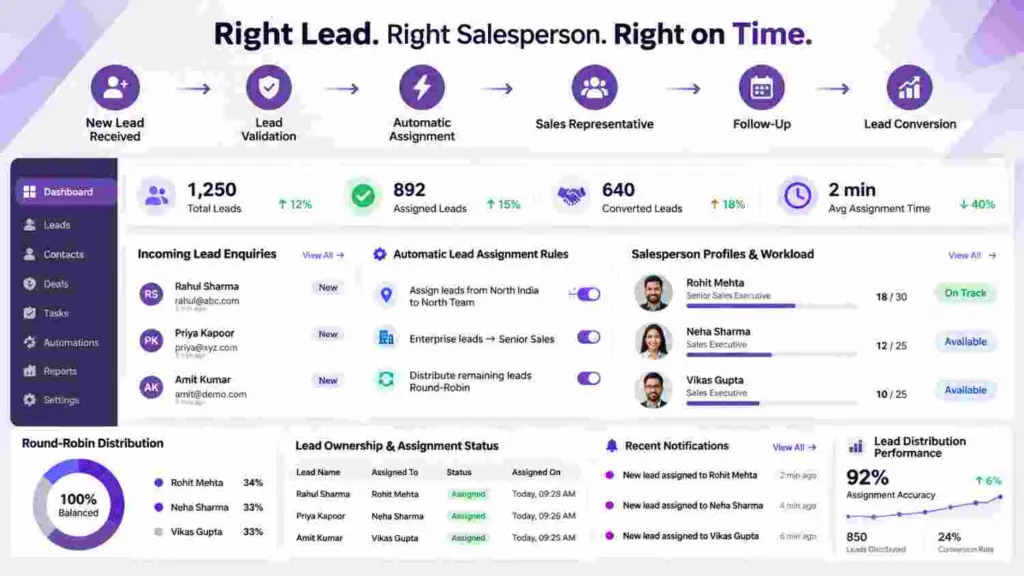
4. Automated Lead Distribution
When businesses receive enquiries from multiple sources, assigning them manually can waste valuable time. Some leads may remain unassigned, while others may be distributed unevenly among sales representatives.
Manual lead assignment can also create confusion about responsibility. Team members may not know which enquiries they need to handle, and managers may find it difficult to monitor lead distribution.
LeadScaler Pro simplifies this process with automated lead distribution. Businesses can configure assignment rules based on their sales team structure and lead requirements.
Key Features
- Round-robin lead assignment among team members.
- Source-based lead distribution.
- Assignment based on deal size or geographical region.
- Routing leads from Meta Ads, website forms, and WhatsApp.
- Automatic WhatsApp notifications to assigned representatives.
- Faster allocation of incoming enquiries.
How Does It Help Your Business?
Automated lead distribution reduces manual work and helps ensure that incoming enquiries reach the appropriate sales representatives.
It also improves accountability because every assigned opportunity has a responsible team member. Managers can review lead allocation and understand how enquiries are distributed across their sales team.
Example: Automatic Assignment of New Enquiries
Suppose your company has four sales representatives and receives new enquiries through its website and WhatsApp.
Instead of manually assigning every enquiry, you can configure round-robin distribution. The system can distribute leads among the available representatives according to the configured rules and notify the assigned person.
This makes the lead management process more organized and helps your team respond to potential customers faster.
Make sure every enquiry reaches the right person without unnecessary delays.
5. Sales Velocity and Revenue Forecasting
Generating leads is important, but understanding how effectively your business converts those leads into customers is equally important.
Many businesses review their sales performance only at the end of the month. By that time, identifying delayed opportunities or conversion problems may be too late to take corrective action.
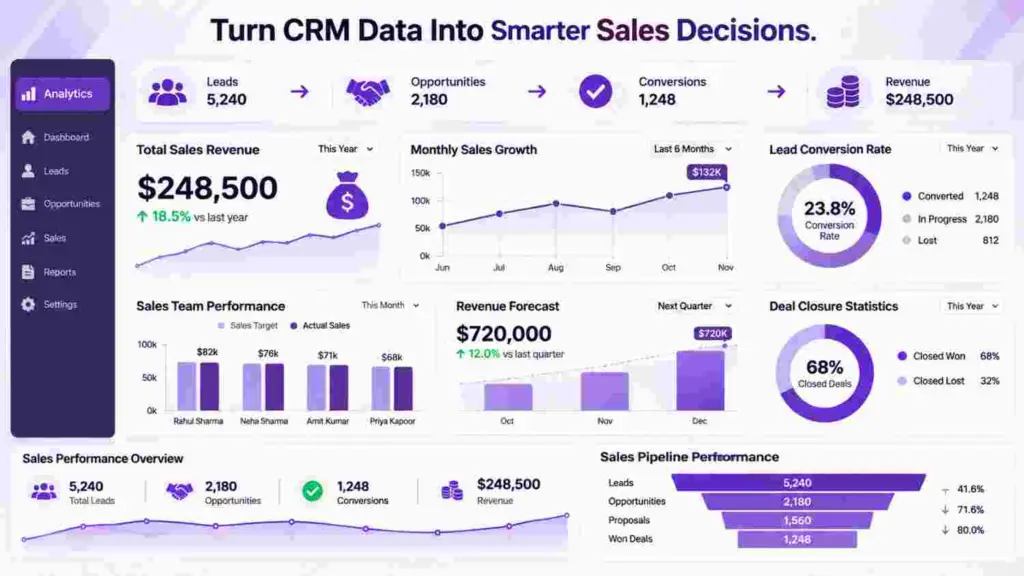
LeadScaler Pro provides sales performance insights that help managers understand pipeline movement, deal progress, and potential revenue.
With centralized sales analytics, businesses can monitor important performance indicators and make more informed decisions.
Key Features
- Live pipeline value monitoring.
- Expected revenue forecasting.
- Average sales cycle analysis.
- Stage-by-stage conversion tracking.
- Identification of conversion drop-off points.
- Individual sales representative performance metrics.
- Overall team closing performance.
How Does It Help Your Business?
Sales analytics help managers understand how effectively their teams are progressing through the sales process.
For example, if a large number of prospects reach the proposal stage but very few become customers, managers can investigate pricing, proposal quality, follow-up timing, or other possible reasons.
Revenue forecasting also helps businesses understand their potential sales position and plan upcoming activities more effectively.
Example: Understanding Your Sales Performance
Suppose your business has multiple active opportunities with different deal values. Some are in the qualification stage, while others have reached proposal or negotiation.
LeadScaler Pro helps you review the overall pipeline value and expected revenue. You can also monitor stage-wise conversion performance to identify where opportunities are progressing or getting delayed.
This gives managers better visibility into sales activities and supports more informed planning.
Understand your sales numbers and make better business decisions with LeadScaler Pro.
Explore Sales Management Features
6. One-Click Data Import and Export
Switching to a new CRM should not mean losing your existing customer information. Many businesses already maintain thousands of contacts in Excel files, CSV spreadsheets, or other CRM platforms.
Manually transferring this information can be time-consuming and may introduce data entry errors.
LeadScaler Pro makes data migration easier with guided import and export functionality. Businesses can bring their existing lead records into the CRM and organize customer information more efficiently.
Key Features
- Import thousands of leads through CSV files.
- Guided column mapping.
- Automatic column detection.
- Custom tag mapping.
- Duplicate detection and smart merging.
- Export organized data into CSV and Excel reports.
How Does It Help Your Business?
Businesses can move from manual spreadsheets to an organized CRM environment without unnecessarily rebuilding their customer database.
Duplicate detection helps identify repeated records, while data mapping makes it easier to match imported information with the appropriate CRM fields.
Export functionality also helps businesses prepare reports, maintain records, and share relevant customer information when required.
Example: Moving from Spreadsheets to CRM
Suppose your business maintains 2,000 customer records in Excel. Instead of manually entering every contact into a new system, you can use the guided CSV import process to map the available columns and transfer the records.
After importing, you can organize customer information, manage opportunities, and track sales activities from one centralized workspace.
Make your transition from spreadsheets to CRM simpler and more organized.
Get Started with LeadScaler Pro
How LeadScaler Pro Improves Your Complete Sales Process
A good CRM should not only store customer information. It should help your team move opportunities towards successful conversions.
LeadScaler Pro supports different stages of the sales journey by combining lead management, automated distribution, customer communication, and performance tracking.
Step 1: Capture New Leads
Receive enquiries from your website, WhatsApp, Meta Ads, and other supported sources. Bring incoming opportunities into a centralized sales workspace.
Step 2: Distribute Leads Automatically
Assign incoming enquiries to the appropriate sales representatives using round-robin or custom distribution rules. Keep ownership clear and improve response management.
Step 3: Qualify and Organize Opportunities
Move prospects into relevant pipeline stages and maintain important customer information, deal values, and sales requirements.
Step 4: Automate Follow-Ups
Use task reminders and deal inactivity alerts to prevent opportunities from being overlooked. Help representatives maintain timely communication with prospects.
Step 5: Manage Customer Conversations
Access WhatsApp messages, emails, appointments, and internal notes through a unified customer timeline. Give your team the information required to continue conversations effectively.
Step 6: Track Performance and Close Deals
Monitor pipeline values, conversion rates, sales velocity, and expected revenue to understand business performance and make better sales decisions.
One Workspace for Your Sales Operations
By bringing these activities together, LeadScaler Pro helps businesses create a more structured sales process where every lead has visibility, every deal has an owner, and every important next action can be tracked.
Who Can Benefit from LeadScaler Pro?
LeadScaler Pro is designed for businesses that want better control over their leads, sales activities, and customer relationships. Its flexible pipeline management and automation capabilities can support different industries and business models.
Marketing and Lead Generation Agencies
Marketing agencies receive enquiries from advertising campaigns, websites, landing pages, and social media platforms. Managing these opportunities manually can become difficult as campaign volumes increase.
With LeadScaler Pro, agencies can organize incoming enquiries, distribute leads among sales representatives, track client consultations, and monitor how effectively marketing-generated opportunities convert into customers.
Real Estate Businesses
Real estate companies handle enquiries from multiple property listings, advertising campaigns, and referral sources.
LeadScaler Pro can help organize property enquiries, schedule customer interactions, manage negotiations, and track opportunities from initial interest to successful booking.
Home Service Companies
Home service businesses frequently receive customer requests for installations, repairs, maintenance, and other services.
A centralized CRM helps organize service enquiries, assign incoming leads, manage customer communication, and monitor pending opportunities.
Software and IT Companies
Software companies and IT service providers manage product enquiries, software demonstrations, custom development requests, quotations, and negotiations.
LeadScaler Pro helps these businesses track software enquiries, manage proposals, maintain customer interaction histories, and monitor opportunities through customized sales pipelines.
B2B Sales Teams
B2B sales processes often involve multiple conversations, decision-makers, quotations, and negotiations before a deal is finalized.
LeadScaler Pro provides a centralized environment to manage business opportunities, coordinate sales representatives, maintain customer communication records, and improve follow-up accountability.
Why Choose LeadScaler Pro for Sales Pipeline Management?
Choosing the right CRM can make a significant difference in how your business manages customer relationships and sales opportunities.
LeadScaler Pro brings essential sales management capabilities together in one workspace, helping businesses reduce manual work and maintain better control over their sales activities.
What Makes LeadScaler Pro Useful for Growing Businesses?
- Simple Sales Management: Manage deals through intuitive visual pipelines.
- Better Follow-Up Control: Receive automated alerts for inactive opportunities.
- Connected Communication: Keep WhatsApp and email interactions organized.
- Faster Lead Assignment: Distribute enquiries using automated rules.
- Clear Sales Insights: Monitor pipeline values and conversion performance.
- Easy Data Migration: Import and export customer records conveniently.
- Mobile-Friendly Access: Manage sales activities while working remotely.
Designed for Simplicity, Speed, and Better Sales Visibility
LeadScaler Pro focuses on helping sales teams spend less time managing spreadsheets and more time building customer relationships.
Its visual interface makes deal management easier, while automation helps reduce repetitive administrative activities. Sales managers can also monitor opportunities and team performance through centralized information.
Improve Sales Management Without Unnecessary Complexity
Whether you are moving from spreadsheets or looking for a more organized way to manage your existing sales operations, LeadScaler Pro provides essential tools to support your business growth.
Frequently Asked Questions About LeadScaler Pro CRM
What is LeadScaler Pro?
LeadScaler Pro is a CRM platform by Purpletree Software LLP that helps businesses manage leads, organize visual sales pipelines, automate follow-ups, handle customer communication, distribute enquiries, and monitor sales performance.
Can I create multiple sales pipelines?
Yes. You can create multiple independent pipelines for different business processes, such as inbound sales, outbound enterprise sales, renewals, and partner deals. Each pipeline can be configured according to its specific sales requirements.
Can I use LeadScaler Pro on mobile devices?
Yes. LeadScaler Pro is responsive on mobile devices, allowing sales representatives to access and update their deals while working remotely or travelling.
Does LeadScaler Pro support WhatsApp integration?
Yes. LeadScaler Pro supports official two-way WhatsApp synchronization, helping businesses manage customer conversations and maintain communication history within their CRM workspace.
Can I automatically assign incoming leads?
Yes. You can configure round-robin distribution or custom assignment rules based on factors such as lead source, deal size, and geographical region. Assigned representatives can also receive WhatsApp notifications.
Can I connect my calendar?
Yes. Appointments booked through discovery links can synchronize with Google Calendar and Outlook with two-way synchronization, helping teams manage scheduled customer interactions.
Can I import my existing Excel or CSV customer database?
Yes. The guided import functionality supports CSV data mapping, duplicate detection, and smart merging to help businesses migrate existing customer information.
How does LeadScaler Pro help prevent missed follow-ups?
LeadScaler Pro provides automated deal inactivity alerts. Businesses can configure inactivity thresholds and generate follow-up tasks for stalled opportunities so sales representatives know which deals require attention.
Can I track sales performance using LeadScaler Pro?
Yes. You can monitor pipeline values, expected revenue, average sales cycle length, stage-wise conversion rates, and individual or team closing performance.
Is LeadScaler Pro suitable for small businesses?
Yes. Its centralized sales workspace and automation capabilities can help small businesses organize enquiries, improve follow-ups, and manage sales activities more efficiently.
Stop Managing Spreadsheets. Start Managing Sales Opportunities.
Your sales team should focus on connecting with prospects, understanding customer requirements, and closing deals — not spending hours updating spreadsheets or searching for old conversations.
When sales information is scattered across different platforms, opportunities can easily be overlooked. A centralized CRM helps bring structure, visibility, and accountability to your sales operations.
With LeadScaler Pro, you get a centralized workspace to organize opportunities, automate follow-ups, manage customer communication, distribute leads, and monitor sales performance.
Whether you are a growing startup, a marketing agency, a real estate business, or an established B2B company, LeadScaler Pro helps bring more clarity and structure to your sales operations.
Start Organizing Your Sales Pipeline Today
Get started with LeadScaler Pro and explore a smarter way to manage leads, track deals, and improve sales follow-ups.
Create Your Free LeadScaler Pro Workspace
Set up your workspace in approximately 2 minutes and explore the platform’s sales management capabilities.
Want to See How LeadScaler Pro Works?
Explore the platform and understand how visual pipelines, automated deal alerts, customer timelines, and lead distribution can support your sales process.
LeadScaler Pro by Purpletree Software LLP
Visual Sales Pipelines. Smarter Follow-Ups. Better Sales Management.
“`
Recent Articles