Managing leads, tracking sales opportunities, following up with customers, and coordinating employees are important activities for every growing business. However, handling these tasks through spreadsheets, emails, and separate applications can create confusion, missed opportunities, and delays.
A Customer Relationship Management (CRM) system helps businesses organize customer information, manage sales activities, automate repetitive tasks, and improve team communication. But with so many CRM platforms available, selecting the right one can be challenging. Here are the important factors to consider when choosing a CRM that supports business growth.
1. Understand Your Business Requirements
Before selecting a CRM, identify your business challenges and the problems you want the software to solve. Every business has different requirements depending on its size, industry, sales process, and customer management activities.
Identify Your Current Challenges
- Leads are scattered across spreadsheets, emails, and messaging applications.
- Sales representatives miss important customer follow-ups.
- Managers cannot easily track sales opportunities.
- Customer communication is not properly recorded.
- Teams spend too much time on repetitive activities.
Choose a CRM that directly addresses these problems instead of paying for unnecessary features.
2. Check Lead and Contact Management Features
Lead management is one of the most important CRM functions. Your CRM should provide a centralized database where employees can access customer details, contact information, enquiry history, lead sources, and important notes.
Important Features to Consider
Centralized Lead Database
Store customer information in one organized location and reduce dependency on multiple spreadsheets.
Lead Assignment
Assign enquiries to the right sales representatives and track who is responsible for each opportunity.
Lead Source Tracking
Identify whether leads come from websites, social media, advertising campaigns, referrals, or other marketing channels.
3. Select a CRM with Visual Sales Pipeline Management
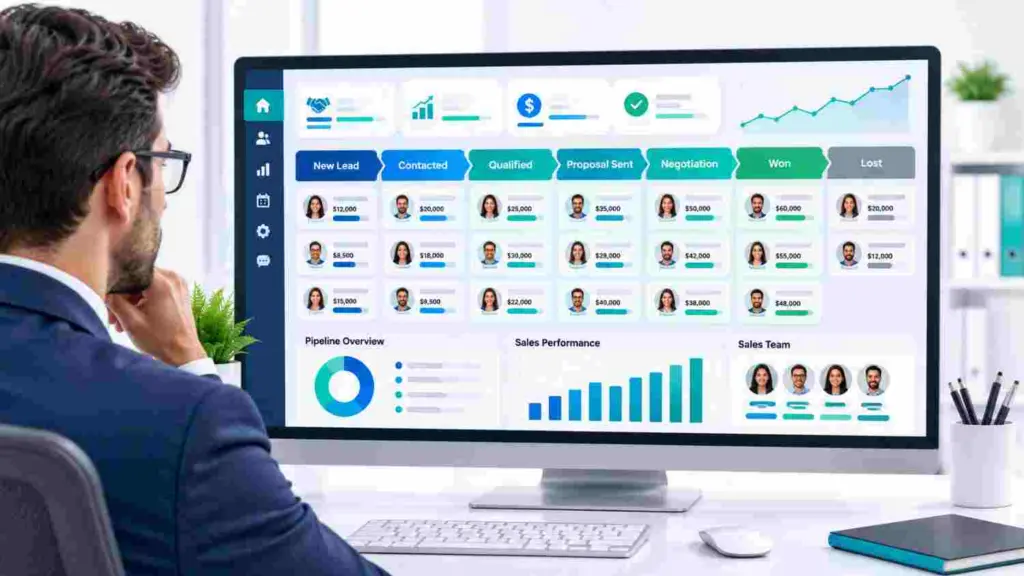
A visual sales pipeline helps businesses understand the current status of every sales opportunity. Instead of manually checking spreadsheets, employees can view deals according to their progress.
Common Sales Pipeline Stages
- New Lead: A potential customer enters the system.
- Contacted: The sales team makes initial contact.
- Qualified: The customer’s requirements are evaluated.
- Proposal Sent: Pricing or a proposal is shared.
- Negotiation: Commercial discussions continue.
- Won or Lost: The opportunity is successfully converted or closed.
This visibility helps managers identify delayed deals, monitor sales performance, and focus on opportunities with higher conversion potential.
4. Prioritize Automation and Follow-Up Management
Regular customer follow-ups are essential for improving sales conversions. However, remembering every call, email, and enquiry becomes difficult as business grows.
Essential Automation Features
Email Automation
Send automatic enquiry acknowledgements, welcome emails, and follow-up messages based on predefined conditions.
WhatsApp Automation
Manage customer conversations and automate supported WhatsApp communication to improve response times and customer engagement.
Task Reminders and Workflows
Automatically create reminders, assign leads, trigger notifications, and organize repetitive sales activities.
5. Evaluate Communication and Team Collaboration
Customer conversations should not remain scattered across different employees and communication platforms. A good CRM helps teams maintain a shared view of customer interactions.
Look for These Capabilities
- Centralized email and WhatsApp conversations.
- Shared team inbox for managing customer enquiries.
- Access to previous customer communication.
- Better coordination between sales and support teams.
- Clear employee responsibilities and activity tracking.
These features reduce communication gaps and help employees deliver consistent customer service.
6. Check Reporting and Sales Analytics
A CRM should provide useful reports that help management understand business performance and make informed decisions.
Important Reports
Sales Performance
Monitor closed deals, total sales, pending opportunities, and employee performance.
Lead Conversion
Understand how many enquiries convert into customers and identify areas where leads are being lost.
Revenue Forecasting
Evaluate active opportunities and estimate potential revenue for better business planning.
7. Consider Ease of Use, Security, and Pricing
Choose a CRM with a simple interface that employees can understand without extensive training. An easy-to-use dashboard, quick navigation, mobile accessibility, and organized customer records can improve team adoption.
Check Security and Scalability
Evaluate user permissions, data protection, backup policies, and access controls. Also ensure that the platform can support more employees, customers, and business activities as your organization grows.
Compare Overall Pricing
Consider subscription charges, user limits, automation features, integration costs, implementation expenses, and customer support. The right CRM should provide useful features and business value within your budget.
8. Why Consider LeadScaler Pro CRM?
If you want to manage leads, sales opportunities, customer communication, and automation through one organized platform, LeadScaler Pro by Purpletree Software LLP is worth exploring.
Key LeadScaler Pro Features
Visual Sales Pipeline
Organize deals, track sales stages, and monitor opportunities through a clear visual workspace.
WhatsApp and Email Automation
Improve customer engagement with two-way WhatsApp communication and automated email responses.
Unified Team Inbox
Manage customer conversations in an organized workspace and improve team coordination.
Sales and Service Workspaces
Organize sales and customer service activities to maintain better visibility across business operations.
Workflow and Calendar Management
Simplify repetitive tasks, manage activities, and keep track of important schedules and follow-ups.
Who Can Benefit?
LeadScaler Pro can be useful for marketing agencies, real estate companies, home service businesses, lead generation agencies, and small and medium-sized organizations that want better lead management and sales automation.
Conclusion: Choose a CRM That Supports Business Growth
The right CRM can make a significant difference in how your business manages customers, sales opportunities, and daily operations. Focus on lead management, visual sales pipelines, automation, communication, reporting, usability, and pricing before making your decision.
Do not select a CRM simply because it offers many features. Choose one that solves your actual business problems and helps your team work more efficiently.
Explore LeadScaler Pro Today
Ready to improve lead management, automate follow-ups, and streamline your sales operations? Explore LeadScaler Pro CRM and discover a smarter way to manage your business.
Manage Leads Better. Automate Follow-Ups. Build a More Efficient Sales Process.
Recent Articles